Friday, August 28, 2009

Hosting The Podcast

I’ve decided to go with Ourmedia as a hosting source. They are associated with the Internet Archive. There in lies my lesson learned today.

I figured out how I’ll modify my web pages to accommodate the podcasts. The one loose end was the hosting site for the much larger podcasts (around 9 to 12 MB).

Went to the library to take advantage of the WiFi connection. Uploaded Podcast#1 but it didn’t seem to store. Got an email that said it was given a name, but no result. Tried a smaller MP3 but had a similar result.

What I didn’t realise is that I need a password account for Internet Archive as well as Ourmedia.

Uploaded another test file from home after I established an account. Worked and appears on Ourmedia.

Next step is to sort out the Creative Commons license.

I also want to record a second podcast before posting the links.

Sunday, August 16, 2009

Podcast #1 Almost Complete

I’ve got the first Podcast complete, I think. The MP3 is 25.8 MB and runs a little over 27.5 minutes. I have to resolve my hosting strategy before I publish it.

Actually, I need to finish at least two more. Then the audience, if any, can have more than one episode to base their opinion on.

It took about 12+ hours to produce, but a lot of that was learning the tools and scripting the episode. I’m using Mind Manager to map/write the script. I create topics and sub-topics, much like the paragraphs in the instructor manual. Then as I read them or decide to modify the description, I can move the topics around. I found I was more comfortable reading them like cue cards.

I’m surprised at how much space the audio takes. I suspect it is a function of how many mistakes I make. “Audacity” is probably saving everything so I can “undo” edits. There are two components. (1) The project, an “.aup” file and (2) a project_data subdirectory. The subdirectory has a bunch of audio files. For the podcast, the .aup was 50 KB. The sub-directory, however, contained 308 objects and consumed 297 MB of space.

I’m guessing that podcast #2 will have less editing since I have the music bumps, intro and outro segments done. Those reuseable segments should just drop in for future projects.

I took the time to think about reuse before I started. I’m keeping MP3 segments for future podcasts. I also started a Mind Manager Map for Knowledge Management (KM). I keep track of each component, by name, and hyperlink to the MP3. The KM map also records and links to any student maps.

Tuesday, August 11, 2009

Podcasting Primer

Found a resource on the web that provides a Step-By-Step approach to podcasting.

Jason Van Orden has posted a multipage article on How To Podcast. Fairly straight forward descriptions without a lot of technical jargon.

Of particular interest is the Audacity audio software and the video tutorials that Jason provides to get you a quick start.

Sunday, August 09, 2009

New Project

Been absent from these pages since the Houston gig. I got diverted by a trip to the Antarctic and getting a photo journal pulled together afterwards.(Hey, when you’re retired what’s a month or two?)

Starting a new project that will cause more frequent posts to this blog. I was inspired, I suppose, by a discussion with someone I hadn’t talked to in a few years. We were discussing MindManager Ver 8. The discussion lead to podcasts and training.

I have toyed with creating a series of podcasts that talk about Workshop Planning. But, never really had the motivation.

Last May I bought an MP3 player, for noise while I walk. I’ve been downloading a lot of Skeptical podcasts after reading about “The Skeptic’s Guide To The Universe” in Wired magazine. The variety of podcasts I’ve listened to since then have convinced me that “I can do that!”

So I was primed for the conversation.

A lot of decisions and resources to locate. I already teach MM Fundamentals, so content per se and structure isn’t an issue. I’ve got to solve and implement the following (not in priority order):

  1. Audio Capture and Editing
  2. Find music for (a) Free and (b) Useable for (marginally) commercial purposes
  3. Podcast Hosting (other than piqueroinc.com [bandwidth])
  4. Examples and Student Map hosting (maybe/maybe not piqueroinc.com)
  5. Framework for a Series Syllabus ( segment topics/features covered)
  6. Create a new company for series examples (Igor’s Baloon Factory)
  7. Revise the Student Maps to reflect my objectives
  8. Build a Knowledge Management Map to keep track of components
  9. Script the episodes using Mind Manager (and save as Show Notes)
  10. Record and edit the materials
  11. Build a better references list of resources for follow-up information
  12. Treat This As A FUN Thing to do, once I commit. (like now)

This is probably the tip of the iceberg, but gives me a current “mission” for Piqueroblog. Keep a diary of how it’s going. It is still business startup for low costs.

Friday, November 07, 2008

Finally Had The Class In Houston

Got home from Houston Tuesday night. Taught two full day classes on the Mind Manager Fundamentals. Had about 12 students in each class.

The sell/perform cycle on this one was longer than usual. The original contact had been in mid-May. After comparing schedules we looked at mid-Summer. Then it took an unexpected turn. Instead of 8-10 students, we were looking at the potential of 33. That had to be two days instead of one.

Now room scheduling became tricky, since we needed two consecutive days. We settled on Sept 15 & 16. Unfortunately, Hurricane Ike came ashore, at Houston, on Sept 12. So the class was cancelled.

We finally got the class scheduled for Nov 3 & 4. So, I drove over Sunday afternoon, conducted the two classes, and drove back Tuesday night.

In preparing for the class I found one change I wanted to make, since this was primarily a research organization. In the thinking styles section there is reference to the Idea Cycle. Typically this is a progression from Create – Organize – Present – Action

I modified the chart to have a more research oriented set of phases. Hypothesize – Filter – Plan – Propose – Test – Observe. It covers the same four larger steps but is more focus on experimentation. It is also consistent with the DMAIC cycle used in six sigma process improvements.

Friday, August 15, 2008

DBA

I'm thinking of offering photographs through a micro-stock site. I usually (c) Igor's Laboratory rather than Piquero Insights. I've been using Igor Laboratory since college. I have it on my amateur radio QSL cards.

So, to differentiate my teaching and consulting from the photo efforts, I've used a different name. But it doesn't make sense to create a new corporation or LLC. I decided to register an "Assumed Name" with the county. Essentially telling the county clerk, "Here's who this business really is." Costs $16 and a trip to Georgetown, but other than that it's not a painful process.

Now the real entrepreneur is the guy that called me at 9AM to ask if I needed credit card processing for Igor's Laboratory? Obviously he checks the county's public records every morning for new businesses. Can the credit card offers be far behind?

Tuesday, July 15, 2008

Meta Data

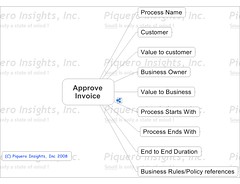
I mentioned in an earlier post that there are actually two maps in a process map, the meta data and the process steps.

What I was driving at is kind of a mixture of project management and six-sigma. The following map is an example of what I would consider meta data for a process. This is important information to have about the process that wouldn’t be in the steps of the process.

MetaProcessMap

I remarked to my audience that this map is more suitable to upper management discussions about the process. If you can’t articulate a value to the customer, why have the process at all.

You would normally attach or hyperlink important documents to this map. In this example I have hyperlinked to the process map for Approve Invoice. That’s why there is a little icon in the lower right of the central topic.

I uploaded the map to Flickr. Click the map to go there and see a better image, many sizes are available.

Monday, July 14, 2008

A Flowchart Map

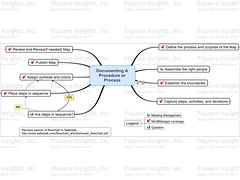
The second example demonstrates the same idea of a process description. This one is more on the order of a clockwise map. The first step is at the one o’clock position.


This map is a rewrite of a flowchart in a whitepaper put out by Saferpak. The paper discusses how to construct a process flowchart. I wanted to show the steps for constructing a process description.

Constructingsaferpak

Notice the decision step in the lower left-hand corner. I’m using relationship arrows to make the flow explicit.

My real reason for constructing this map was to think about how MindManager could be used to contruct a process flow. The little red checkmarks are steps that can take advantage of MindManager’s capabilities. (On second thought, you can also use MindManager to brainstorm "who to invite to the meeting.")

I uploaded the map to Flickr. Click the map to go there and see a better image, many sizes are available.

An Example Of A Process Description

A comment asked if I had any examples. I do, though some are more complex than I care to share. Some examples have company information. Instead I'll use two of the maps I used during my class. They are simple examples but make the point.

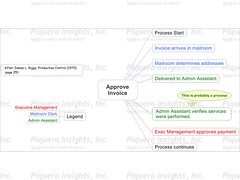
In James L. Riggs’ textbook Production Systems: Planning, Analysis, and Control (1970) there is a section on process charts. These are more the standard industrial engineering approaches, but the "process" on page 251 is simple and easy to identify with.

ApproveInvoice1

This map has been color coded to indicate who is doing the step. I’ve used a callout to indicate that a step is actually a process itself, this would link to another process map.

I uploaded the map to Flickr. Click the map to go there and see a better image, many sizes are available.

Saturday, July 12, 2008

Process Mapping

Had the class and a constructive discussion about using MindManager for process definition and discussion. Once you get past the clockwise layout of most maps it gets easier.

I wanted to emphasize a couple of key points:

  • Each process has two or more maps. One is meta data about the process. The second and other maps describe the steps of the process.
  • The use of color, putting borders around groups of topics, and using callouts help you explain key points.
  • Colors and icons can be filtered. I can reduce a complex map to just the topics of interest, i.e. the ones that need attention or elimination.
  • Data gathering is a two person task. One person builds the map and the other facilitates the meeting.
  • Keep it under 10 steps. A complicated map is probably hard to follow, and probably describe collections of steps that could be their own "process map"

There is a lot of power to using a hierarchy of maps and taaking advantage of hyperlinks to other documents. That becomes second nature after a while. It getting started that is the challenge.

Friday, June 27, 2008

New Business

Going to be a busy Summer. Two classes to teach but with different challenges.

One is a repeat client, which is always good. Training someone who missed the class. But, spending time on my real professional interest; we’re going to do a short introduction to process mapping. That will be after the July 4th weekend.

And a new client at the end of August. The challenge here will be to develop a module for Mindjet Connect, the latest release has collaboration capabilities.

I’d beta tested the Connect version. Used a couple folks from the training class, in Detroit, last year. So I’ve got notes about what did and didn’t work. But I need to think of example to demonstrate the capabilities.

Sunday, June 22, 2008

Business Networks

Just finished reading a blog post , by Guy Kawasaki, on how to use LinkedIn more effectively.

For example, the post notes that you can personalize your profile URL. This can put your name in the URL rather than a system generated name. Makes it easier to bubble to the surface on a search engine query.

It also pointed out using customized buttons to make it easier to find your profile.

I've added the button to the links section of the blog, down near the bottom. I suspect it works inline too. Like this: View Robert Rowen's profile on LinkedIn

LinkedIn is essentially a professional social network. I've received a couple of invites, so I decided to put my profile into the works. It doesn't cost anything to join, only if you want advanced features.

Monday, June 09, 2008

Web Maintenance

Spent this afternoon reworking a web page. Pointed out two important lessons, or at least reinforced something I already knew.

  1. Your local PC back-up copy of the web site may not reflect your actual web site content.
  2. Files transferred to a new laptop may not contain all the versions of the web site.

These become important considerations when you're 1100 miles from home and can't fire up the old laptop.

The site has evolved over the last 6 years. Some changes were experimental, but some were important at the moment. Then, having solved the project at hand, that section was left alone. You sometimes forget which files were the active versions. That's the case at hand. My "new laptop" version has files from 2004 but I made some additions in 2006.

What initiated this effort was the work about a month ago when I installed Google Analytics. I checked it yesterday and found that most search referrals are for "Brainstorming Examples" and the common entry is page PiqueroHome-181.The text on PH-181 is a little longer than I'd like. And, Brainstorming is only one example of many of the sample maps on the page.

I decided to rewrite the page and make sure the Brainstorming example was within the initial view. That's when I realized I didn't have the "master" of the current page.

Got it done. So if you're interested, here's the new page.

Sunday, May 18, 2008

Web Site Tracking

I tested Google Analytics with both the blogs and the home site. I placed the code snippet on 5 pages. Seemed to work capturing 4 of the pages. So, it is possible the “body” segment doesn’t execute in the index.htm. It all takes place in the frame. At least that’s an explanation.

I updated 10 more pages today. That should give me coverage for the major paths through the site. It’ll take a little time for my testing to be reflected in the reports. I should leave the site from different pages to see how that shows up. Also need to visit the site an hour later, just so it looks like a different visit.

I don't sell product through the site. It is mostly an information source. But I'm intrigued to see if it can report navigation.

Friday, May 16, 2008

Analytics

Added a Google-Analytics account to the 9EdgeDown Blog. Very similar to "sitemeter" in that they give you a code snippet to install in your web page. In this case the older template version of blogger, I didn't convert Piqueroblog, at first.

I had trouble registering the site using my Firefox browser. So, tonight I switched over to IE and the continue buttons appeared. May be that I had popups blocked in Firefox.

Friday, May 02, 2008

Opportunity Knocks

Got a call from Houston. Possible class this Summer. Still in the very preliminary stages but she didn’t seem put-off by my answers as far as cost & time. Her principal currently uses Version 6, has upgraded to 7. There’s been some promotional offers of late that has him interested in getting the staff trained.

For the most part, I’m more economic if you have more than 5 people you want trained. One person’t travel and living for a hotel stay is cheaper than 5. And the 5 don’t have to take time out to travel.

In a way I charge for my travel time, just like my prep time is built into the rates for a class. Other than copies of some material, I have very little additional expense to Piquero when I teach another class. And I now have a laptop that runs Ver 7. The old one was just that, too old.

I’ve “commuted” to Houston before, in a previous life. Taught classes in Dallas too. It’s a long ride, but if you pick the right time it isn’t too bad. It’s the drive home, at 5pm, that’s the killer.

Tuesday, April 29, 2008

Load and Download

Well, 95% success with the new laptop. Got most of the software I want loaded and activated. My only failure seems to be my accounting program. The reboot didn’t behave properly. It may have been my fault for removing the CD before powering down. It launches the "splash" but doesn’t come up.

As it stands I have the Microsoft Office apps (Word, Excel, and Power Point), the Lotus apps (Word Pro, 123, and Freelance), and Microsoft’s Visio. MS Office was preloaded. I also installed Mind Manager Ver 7 and Paint Shop Pro 8.1.

I installed the PeoplePC dial-up program. The laptop has a wireless antenna built in, so I can use hot spots like the Round Rock library for higher speed access. Used the high speed access to download the Firefox Browser and the Adobe Reader.

Now the challenge is to migrate the needed files. I had always separated my engagements into subdirectories under a “Client” directory. That means duplication of files but an easy structure to migrate. And Jump Drives make the task easy.

Friday, April 25, 2008

Hardware Upgrade

Got the new laptop in the mail yesterday. Now starts the task of getting the settings and the software loaded. Part of the trick is remembering where the software is.

I normally use an analog connection. As soon as I established that connection, the web browsing got real slow. The anti-virus software is smart enough to start an automatic update. After 17 meg (at 45 kbps) I disconnected.

Today I'm at the library, which has a free hot spot. The live update was a total of 45 meg. A lot quicker through the wireless network. But, it forces a system reboot to take effect. Got to finish this post.

Saturday, April 19, 2008

Class A Success

Got through the classes yesterday. The feedback was positive. As usual there were some lessons learned.

  • One of the boxes on the Word Export Settings Dialog allows you to generate and embed a table of contents. This would be useful for larger multi-page documents.
  • Your throat gets sore after 5 of the 7 hours. I learned that in Detroit and forgot. Next time I'll bring some hard candy with me.
  • Always make sure the IT Tech is available at the start-up of the class. We didn't have any major problems, but some of the computers were asking for a sign-on (which was "enter").
  • At the end of the class it took an admin sign-on to remove the Mind Manager programs. The Tech had loaded them the day before but didn't think signing on as administrator was out of the ordinary. The student sign-on didn't allow the deletion of programs from Control Panel.

And, most important event, I got the check the same day as the class. Always nice to get paid promptly. Industrial clients are often 45 days, standard terms.

Friday, April 11, 2008

Another Class

Gearing up to teach another Mind Manager Fundamentals class next Friday. This one will be slightly different because of time pressures (for the client).

Instead of the normal 7+ hour Fundamentals, I’m going to be teaching two 4 hour classes back to back. The students are all pretty busy. So giving up 4 hours was doable, while 7 hours was not.

After the classes last Fall I went through the manuals with my technical editor eyeshades on. The new training director at Mindjet used my notes (which I sent him) to update the student manual. So, I now have 12 of the new student manuals for the class.

Adjusting the class wasn’t too hard. I dropped the Project Management and the Knowledge Management Modules. I’ll need to trim the thinking styles presentation.